|
<< Click to Display Table of Contents >> Basic concepts |
  
|
|
<< Click to Display Table of Contents >> Basic concepts |
|
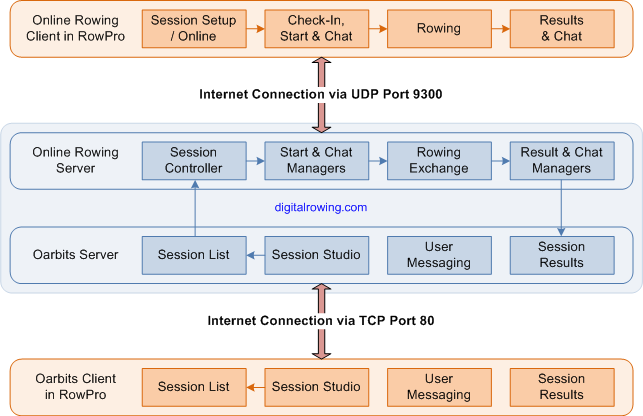
RowPro connects to the Online Rowing Server at digitalrowing.com to participate in live Online Rowing sessions. The Online Rowing Server handles the live, real-time processes by which these sessions are rowed online.
Supporting this, RowPro also connects to the Oarbits Server at digitalrowing.com to set up and join Scheduled Rows and to view Session Results. The Oarbits server handles the prior scheduling of sessions and the subsequent posting of results. The Oarbits Server is a part of the Digital Rowing website and can also be visited via a standard web browser at www.digitalrowing.com/oarbits.
The main components of the Online Rowing system are shown in the diagram below:
There are two basic types of Online Rowing session:
This is a session where the participants intend to row right away, as soon as the Quick Row is created. One of the participants creates the Quick Row, the others join it immediately, they start, they row, they're done. This suits people who just sign in, hang around in Chat, and find other people who are available to row right away.
This is a session that the creator schedules to start at a specified GMT time and date in the future. This makes it possible for participants to join in advance, and is the preferred way of organizing Online Rowing for individuals, groups, online regattas, and any other situations where advance planning is important.
With a Scheduled Row, one person creates the Scheduled Row in Oarbits, and then other people see and join the Scheduled Row in Oarbits. This means a participant list builds up in Oarbits, usually days or weeks before the Scheduled Row is scheduled to start. The creator of the Scheduled Row may choose to make it:
Anyone can join the Scheduled Row in Oarbits and be added to the list of participants, or
The creator invites specific participants to join the Scheduled Row which is not available to others.